

Swift Macros in Action: Compile-Time Code Generation

Anna Kulieshova
May 11, 202610 min read
With the release of Swift 5.9, Apple introduced Swift Macros, a powerful feature designed to bring type-safe metaprogramming to the language. Macros allow developers to generate code at compile time, reducing boilerplate, improving maintainability, and making Swift codebases more concise and expressive.
What Are Swift Macros?
Swift macros are compile-time code transformations that expand into actual Swift code before compilation completes. Think of them as instructions for the compiler to write code on your behalf, intelligently and safely, and they are:
- Executed at compile time.
- Helpful for reducing repetitive code.
- Built on SwiftSyntax for safety.
- Great for improving code clarity and maintainability.
Swift provides a variety of macro types tailored for different use cases:
- Declaration Macros are tools that generate entirely new declarations.
- Expression Macros create expressions that are then inserted in place.
- Peer Macros add declarations that appear adjacent to the one they are attached to.
- Accessor Macros automatically generate accessors, such as getters and setters.
- Member Macros add new members to a type, for example, a computed property.
- Conformance Macros automatically make a type comply with a specific protocol.
- Extension Macros are used to generate extensions on existing types.
How Macros Work
At a high level, macros operate by transforming Swift's Abstract Syntax Tree (AST) during compilation. Here is how:
- Macro expansion occurs at compile time.
- The macro operates on the Swift AST, parsing and generating code.
- Macros take source input and produce valid Swift code.
- Expansion runs in a separate process for security.
- Expansion uses the SwiftSyntax framework to parse and emit code.
Macro Architecture

The following list, which is based on the provided Macro Architecture diagram, outlines the three main components and explains the role each part plays in the process of code generation:
- Client Code is the place where you use the macro.
- Macro Definition is the part that declares what the macro does and its specific type.
- Macro Implementation contains the logic that is used to generate the new code.
Project Structure
To implement and use Swift Macros effectively, your Swift package needs to be structured in a very specific way. The macro system separates the definition (used by the app or library) from the implementation (which actually generates the code). Here is how the TrueMacros package is organized, including where each part of the macro lives and how everything connects:
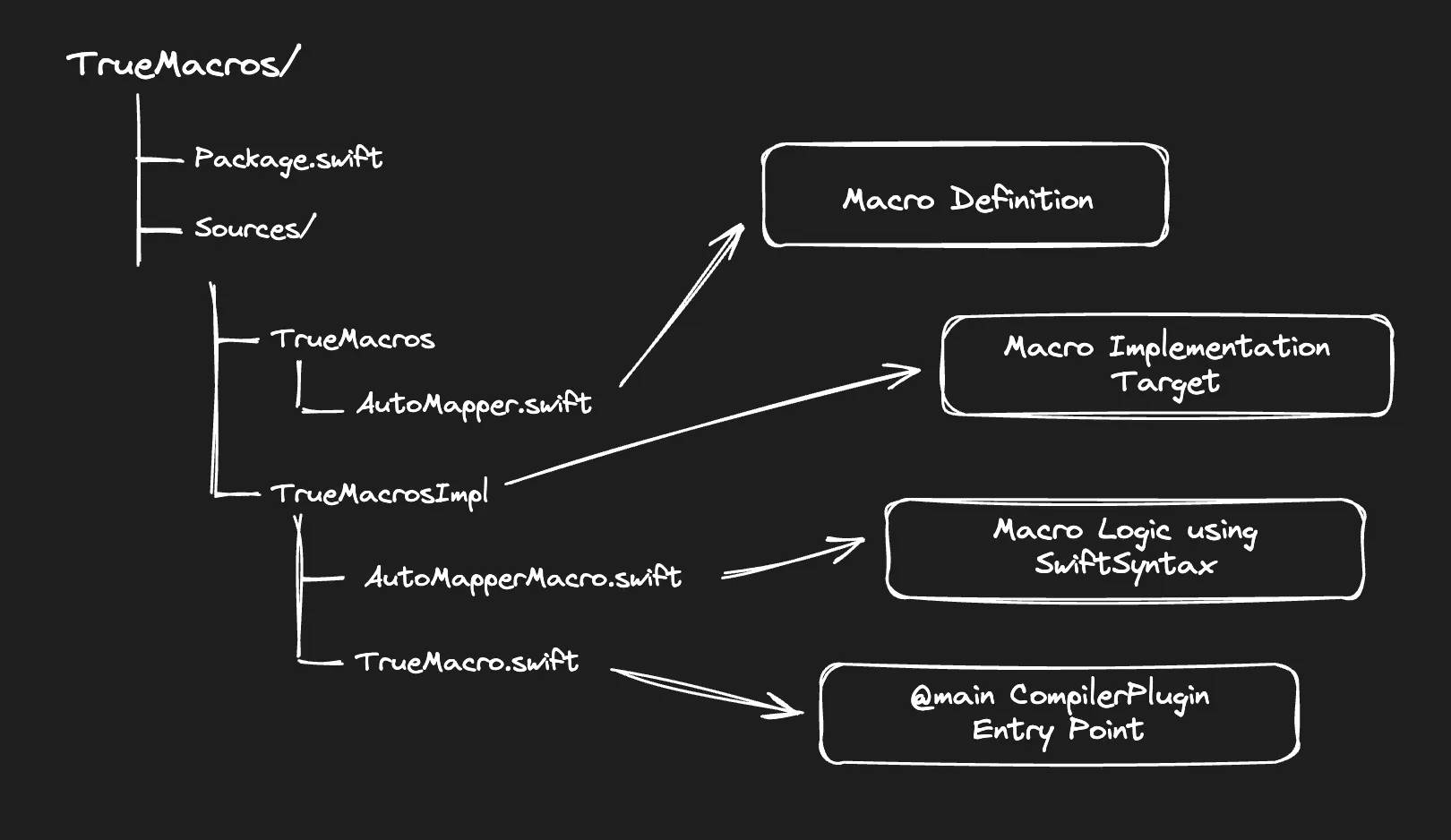
The image illustrates how a Swift package containing macros must be structured. The following list details the specific purpose of the four key files involved and how they connect the definition to the implementation:
- AutoMapper.swift: Where @AutoMapper and its macro type are declared.
- AutoMapperMacro.swift: Implements the logic to generate code at compile time.
- TrueMacro.swift: Registers AutoMapperMacro with the Swift compiler.
- Package.swift: Links everything together via proper targets and dependencies.
Package Setup for Swift Macros
The Package.swift file below configures the macro package, separating the client library from the compiler plugin and defining platform compatibility.
The .iOS(.v16) platform minimum means the generated code supports iOS 16. Although the macro feature requires the Swift 5.9 compiler (Xcode 15), the resulting code can target older systems. However, iOS 17 is often targeted because major new features, like the Observation framework using the @Observable macro, are only available from that version.
Package Setup for Swift Macros
The Package.swift file below configures the macro package, separating the client library from the compiler plugin and defining platform compatibility.
The .iOS(.v16) platform minimum means the generated code supports iOS 16. Although the macro feature requires the Swift 5.9 compiler (Xcode 15), the resulting code can target older systems. However, iOS 17 is often targeted because major new features, like the Observation framework using the @Observable macro, are only available from that version.
Package.swift
import CompilerPluginSupport
let package = Package(
    name: "TrueMacros",
    platforms: [
        .iOS(.v16), .macOS(.v10_15)
    ],
    products: [
        .library(name: "TrueMacros", targets: ["TrueMacros"])
    ],
    dependencies: [
        // SwiftSyntax dependency
        .package(url: "https://github.com/apple/swift-syntax", from: "509.0.0")
    ],
    targets: [
        .target(
            name: "TrueMacros",
            dependencies: [ "TrueMacrosImpl" ]
        ),
        .macro(
            name: "TrueMacrosImpl",
            dependencies: [
                .product(name: "SwiftSyntaxMacros", package: "swift-syntax"),
                .product(name: "SwiftCompilerPlugin", package: "swift-syntax")
            ]
        )
    ]
)
The components of the macro-enabled Package.swift file serve the following purposes:
- CompilerPluginSupport import is what enables the use of the .macro target type.
- TrueMacros target is the public-facing library that your app or other packages will use, which contains the macro definitions.
- TrueMacrosImpl target contains the macro implementations that use SwiftSyntax and are compiled separately using the .macro target type.
- Dependencies refer to the swift-syntax package that provides the tools for parsing, analyzing, and generating Swift code, including products like SwiftSyntaxMacros that define macro types and protocols, and SwiftCompilerPlugin that connects macro logic to the Swift compiler.
Note: Macro implementation must be in a separate target with the .macro type to work correctly with the compiler plugin architecture.
Entry Point: Registering Macros
Macros are exposed to the compiler within the macro implementation (TrueMacrosImpl) by conforming to the CompilerPlugin protocol:
TrueMacro.swift
import SwiftSyntaxMacros
import SwiftCompilerPlugin
@main struct TrueMacro: CompilerPlugin {
    var providingMacros: [Macro.Type] = [
        AutoMapperMacro.self
    ]
}
The function of each element in the TrueMacro.swift file, which serves as the required entry point for the macro plugin, is as follows:
- @main: Marks this struct as the entry point for the plugin.
- CompilerPlugin protocol: Tells the compiler this is a macro plugin.
- providingMacros: An array of macros you want to expose. Each must conform to one of the macro protocols (e.g., ExtensionMacro, MemberMacro, etc.).
This is the plug that connects the macro with the Swift compiler. Without this, macro won’t be recognized or invoked during compilation.
Creating a Macro: Two Key Parts
Macro Definition
The macro definition resides in the TrueMacros target and declares the interface:
@attached(extension, names: arbitrary)
public macro AutoMapper<T>(from: T) = #externalMacro(
    module: "TrueMacrosImpl",
    type: "AutoMapperMacro"
)
The #externalMacro directive maps this public definition to the specific type that handles the implementation logic.
Macro Implementation
Macro is implemented inside TrueMacrosImpl using SwiftSyntax. The primary macro expansion method, which serves as the core interface between the Swift compiler and your custom macro logic, is the expansion function that receives the Abstract Syntax Tree (AST) elements representing the code it is attached to, processes those elements, and returns new AST elements (the generated code) to be inserted by the compiler. This function is defined as a static method within your macro implementation struct:
public static func expansion(
    // 1.
    of node: AttributeSyntax,

    // 2.
    attachedTo declaration: some DeclGroupSyntax,

    // 3.
    providingExtensionsOf type: some TypeSyntaxProtocol,

    // 4.
    conformingTo protocols: [TypeSyntax],

    // 5.
    in context: some MacroExpansionContext
) throws -> [ExtensionDeclSyntax] {
    // ... implementation
}
Here is the detailed explanation for the parameters marked in the code above:
- The macro usage itself (node) represents the specific attribute node in the source code where the macro is being called (e.g., @TrueMacro). This is used to inspect arguments passed to the macro.
- The declaration the macro is attached to (declaration) provides access to the code block the macro is decorating (e.g., a struct, class, or enum). This is used to understand the properties or methods of the type that are being modified.
- The type being extended (type) represents the type definition that will receive the extension. This is crucial for ensuring the generated code references the correct type context.
- The list of protocols (protocols) defines the specific protocols that the generated extension is required to implement.
- Context for diagnostics and unique names (context). This is a toolkit for communicating back to the compiler. This is used to generate unique variable names to avoid collisions and to emit build errors or warnings if the macro is used incorrectly.
Full Implementation: AutoMapperMacro.swift
This segment illustrates the expansion method's implementation, showing how it receives the declaration's Abstract Syntax Tree (AST) and converts that information into the desired mapping extension code.
import SwiftSyntax
import SwiftSyntaxBuilder
import SwiftSyntaxMacros
public enum MacroExpansionError: Error {
    case invalidStruct
    case nonStaticString
    case missingProperties
}
public struct AutoMapperMacro: ExtensionMacro {
    public static func expansion(
        of node: AttributeSyntax,
        attachedTo declaration: some DeclGroupSyntax,
        providingExtensionsOf type: some TypeSyntaxProtocol,
        conformingTo protocols: [TypeSyntax],
        in context: some MacroExpansionContext
    ) throws -> [ExtensionDeclSyntax] {
        // 1.
        guard let structDecl = declaration.as(StructDeclSyntax.self) else {
            throw MacroExpansionError.invalidStruct
        }
        // 2.
        guard let arguments = node.arguments,
              let labeledExpr = arguments.as(LabeledExprListSyntax.self)?.first?.as(LabeledExprSyntax.self)
        else {
            throw MacroExpansionError.nonStaticString
        }
        let fromType = labeledExpr.expression.description.trimmingCharacters(in: .whitespacesAndNewlines)
        // 3.
        let properties = structDecl.memberBlock.members.compactMap { member -> String? in
            guard let varDecl = member.decl.as(VariableDeclSyntax.self),
                  let pattern = varDecl.bindings.first?.pattern else {
                return nil
            }
            return pattern.description.trimmingCharacters(in: .whitespacesAndNewlines)
        }
        guard !properties.isEmpty else {
            throw MacroExpansionError.missingProperties
        }
        // 4.
        let initBody = properties.map {
            "self.\($0) = other.\($0)"
        }.joined(separator: "\n")
        // 5.
        let structName = structDecl.identifier.text
        // 6.
        let generatedCode = """
        public extension \(structName) {
            public init(mapping other: \(fromType)) {
                \(initBody)
            }
        }
        """
        // 7.
        let extensionDecl = try SyntaxParser.parse(source: generatedCode)
            .statements
            .compactMap { $0.item.as(ExtensionDeclSyntax.self) }
        return extensionDecl
    }
}
The expansion function serves as the standardized compiler interface, acting as the crucible where the static structure of the attached Swift code is dynamically analyzed via SwiftSyntax and then reconstructed with the generated logic. The main steps performed by the macro are as follows:
- Verify the Attached Declaration is a Struct:
- We use declaration.as(StructDeclSyntax.self) to ensure the macro is only attached to a struct, as its logic depends on struct member properties. If it's not a struct, an invalidStruct error is thrown. - Extract the Type from the Macro Attribute:
- This block navigates the node (the @AutoMapper(...) attribute) to find the argument provided (e.g., from: "Type").
- The string literal (e.g., "UserDTO") is extracted and cleaned to get the source type, and an error is thrown if the argument is missing or not a static string. - Extract Property Names from the Struct:
- We iterate through the memberBlock of the struct declaration to find all member variables (var).
- Non-variable declarations (like functions or nested types) are ignored, and a list of all variable names is collected.
- A check ensures the struct is not empty, throwing missingProperties if it has no variables to map. - Generate Initializer Body Code:
- The extracted property names are mapped to generate the body of the new initializer. This creates statements like: self.propertyName = other.propertyName, using a joined(separator: "\n") to build the complete initializer body string. - Get the Struct Name:
- The name of the struct itself is extracted to properly construct the extension header (e.g., User). - Build the Extension Code:
- A multiline string literal is used to construct the final Swift code, combining the struct name, the source type, and the generated initializer body into a complete public extension ... block. - Convert to SwiftSyntax and Return:
- The generated string code must be parsed back into a SwiftSyntax node (ExtensionDeclSyntax) which represents the Abstract Syntax Tree (AST) of the new extension.
- The macro returns this array of new nodes to the compiler for insertion into the final source file.
By successfully implementing this function, this macro registers its capability as a powerful compile-time code transformer within the Swift ecosystem, fulfilling the promise of boilerplate automation.
Example Usage of @AutoMapper
To illustrate the AutoMapper macro in action, consider the following client code where we map a data transfer object (UserDTO) from a larger data model (User):
struct User {
    let id: Int
    let name: String
    let email: String
    let address: String
    let zipCode: Int
}
@AutoMapper(from: User)
struct UserDTO {
    let id: Int
    let name: String
    let email: String
}
And the AutoMapper macro implementation, as described earlier, this is what will be generated at compile time:
public extension UserDTO {
    public init(mapping other: User) {
        self.id = other.id
        self.name = other.name
        self.email = other.email
    }
}
This generated initializer is immediately available to the client code, enabling a clean and type-safe conversion from User to UserDTO. Crucially, this code is inserted directly by the compiler, meaning developers never have to manually write or maintain these repetitive mapping methods. It ensures the mapping logic is always up-to-date with the property names defined in the structures.
How It Works
The AutoMapper macro works by first inspecting the UserDTO structure to identify its stored properties. Upon analysis, it detects three specific properties: id, name, and email. Based on this discovery, it is assumed that the source type, User, also contains these same properties. Finally, the macro generates a new initializer that automatically maps the values from a User instance directly into a new UserDTO instance.
Key Benefit
You didn’t have to manually write:
init(mapping other: User) {
    self.id = other.id
    self.name = other.name
    self.email = other.email
}
That’s the beauty of Swift Macros: clean, safe, automated boilerplate removal.
What's Next?
Swift Macros, combined with SwiftSyntax and the CompilerPlugin, provide incredible developer superpowers. We have covered how to define and implement a Swift macro from scratch, including setting up the package structure and registering the macro with the compiler. This process demonstrates the power of generating real, type-safe code at compile time, which effectively eliminates boilerplate from a codebase. Macros truly represent the future of Swift metaprogramming, offering a path to making code more expressive, reusable, and clean starting today.
While powerful, adopting macros introduces complexities such as a steep learning curve required to master SwiftSyntax, more difficult debugging processes due to compile-time expansion, and potential increases in build times from the extra processing overhead.
To deepen your understanding, the official Apple sessions from WWDC 2023 are an excellent starting point. The Write Swift Macros session provides a foundational walkthrough of the macro template and testing, while Expand on Swift Macros dives into advanced topics like diagnostics and inspecting syntax trees.
For a comprehensive guide, the Swift Programming Language: Macros documentation offers the official reference for syntax and rules.
Finally, mastering the Abstract Syntax Tree is essential for complex macros. The structure of code nodes can be inspected in real-time using the online Swift AST Explorer tool, which visualizes how code is parsed.
The introduction of macros marks a significant evolution in the Swift ecosystem, offering a standard, native way to generate code safely. Whether for simple conveniences or complex architectural patterns, they provide the key to unlocking a more efficient development workflow.
Anna Kulieshova
May 11, 202610 min read