Check if Your Phone Supports Truecaller eSIM
Check whether your device is compatible with Truecaller eSIM before purchasing a plan. Most smartphones released from 2018 onwards support eSIM, but there are exceptions based on carrier locking and regional variants.
What makes a device compatible?
To use a Truecaller eSIM, your device must meet all three of the following conditions:
- The device supports eSIM technology natively (has an embedded SIM chip)
- The device is not carrier or network locked to a specific operator
- The device has not been jailbroken (iOS) or rooted (Android)
Most iPhones from XS (2018) onwards and most Android devices from 2020 are compatible.
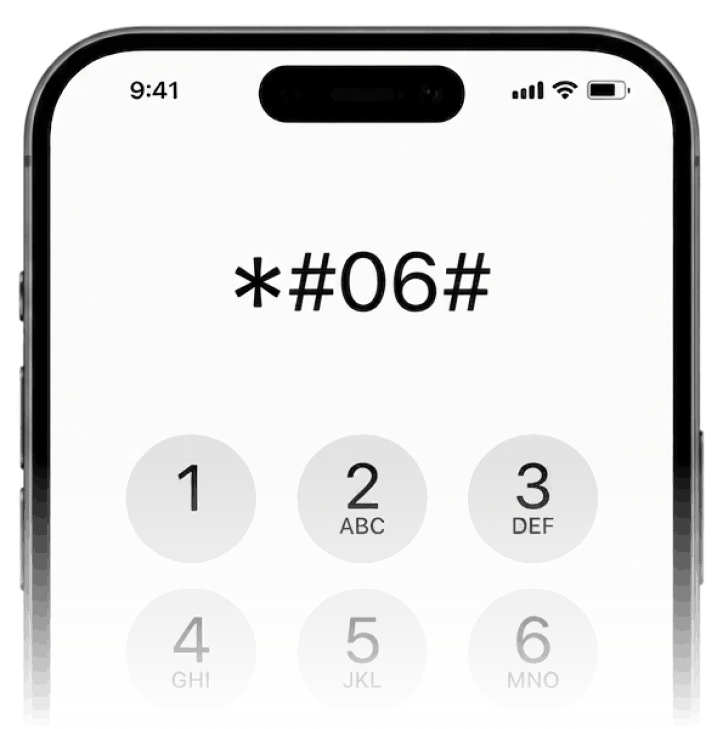
Dial *#06# to confirm compatibility
If an EID number appears on screen, your phone supports eSIM
Some regional variants of otherwise compatible devices do not support eSIM. For example, certain iPhone models sold in mainland China, Hong Kong, and Macao use a dual physical SIM configuration instead of eSIM. Always verify the specific model variant you have, not just the model name.
List of compatible devices
Search by device name or brand to find your phone.
- Galaxy S25
- Galaxy S25 Edge
- Galaxy S25 Slim
- Galaxy S25 Ultra
- Galaxy S25+
- Galaxy S24
- Galaxy S24 FE
- Galaxy S24 Ultra
- Galaxy S24+
- Galaxy S23
- Galaxy S23 5G
- Galaxy S23 FE
- Galaxy S23 Ultra
- Galaxy S23+
- Galaxy S22
- Galaxy S22 5G
- Galaxy S22 Ultra
- Galaxy S22 Ultra 5G
- Galaxy S22+
- Galaxy S22+ 5G
- Galaxy S21 5G
- Galaxy S21 Ultra 5G
- Galaxy S21+ 5G
- Galaxy S20
- Galaxy S20 5G
- Galaxy S20 Ultra
- Galaxy S20 Ultra 5G
- Galaxy S20+
- Galaxy S20+ 5G
- Galaxy A56
- Galaxy A55
- Galaxy A55 5G
- Galaxy A54 5G
- A36
- Galaxy A36
- A35
- Galaxy A35 5G
- Galaxy 24 FE
- Galaxy A23 5G
- Galaxy Note 20
- Galaxy Note 20 5G
- Galaxy Note 20 Ultra
- Galaxy Note 20 Ultra 5G
- Galaxy Note20
- Galaxy Note20 5G
- Galaxy Note20 Ultra
- Galaxy Note20 Ultra 5G
- Galaxy A17
- Galaxy Flip7
- Galaxy XCover7 Pro
- Galaxy Z Flip7 FE
- Galaxy Z Fold7
- Galaxy Z Flip6
- Galaxy Z Fold 6
- Galaxy Flip 5
- Galaxy Fold 5
- Galaxy Z Flip 5
- Galaxy Z Flip 5G
- Galaxy Z Fold 5
- Galaxy Watch4
- Galaxy Watch4 Classic
- Galaxy Z Flip 4
- Galaxy Z Flip4
- Galaxy Z Fold 4
- Galaxy Z Fold4
- Galaxy Z Flip 3 5G
- Galaxy Z Flip3 5G
- Galaxy Z Fold 3
- Galaxy Z Fold3
- Galaxy Z Fold 2 5G
- Galaxy Z Fold2
- Galaxy Fold
- Galaxy Z Flip
- Galaxy Z Fold
- Galaxy Z TriFold
- iPhone 18 Pro
- iPhone 18 Pro Max
- iPhone 17
- iPhone 17 Pro
- iPhone 17 Pro Max
- iPhone 17e
- iPhone 16
- iPhone 16 Plus
- iPhone 16 Pro
- iPhone 16 Pro Max
- iPhone 16e
- iPhone 15
- iPhone 15 Plus
- iPhone 15 Pro
- iPhone 15 Pro Max
- iPhone 14
- iPhone 14 Plus
- iPhone 14 Pro
- iPhone 14 Pro Max
- iPhone 13
- iPhone 13 Mini
- iPhone 13 Pro
- iPhone 13 Pro Max
- iPhone 12
- iPhone 12 Mini
- iPhone 12 Pro
- iPhone 12 Pro Max
- iPhone 11
- iPhone 11 Pro
- iPhone 11 Pro Max
- iPhone Air
- iPhone Duo
- iPhone SE (2020 and 2022)
- iPhone SE 2nd Gen
- iPhone SE 3rd Gen
- iPhone XR
- iPhone XS
- iPhone XS Max
- iPhone XS Max Global
- iPad Pro 12.9 inch 3rd Gen (1TB, WiFi+Cellular)
- iPad Pro 12.9 inch 3rd Gen (WiFi+Cellular)
- iPad Pro 12.9 inch 4th Gen (WiFi+Cellular)
- iPad Pro 12.9 inch 5th Gen
- iPad Pro 12.9 inch 6th Gen
- iPad Pro 12.9-inch (from 3rd generation)
- iPad Pro 11 inch 3rd Gen
- iPad Pro 11 inch 3rd Gen (1TB, WiFi+Cellular)
- iPad Pro 11 inch 3rd Gen (WiFi+Cellular)
- iPad Pro 11 inch 4th Gen
- iPad Pro 11 inch 4th Gen (WiFi+Cellular)
- iPad Pro, 11-inch (from 1st generation)
- iPad 10th Gen
- iPad 8th Gen (WiFi+Cellular)
- iPad (from 7th generation)
- iPad Air 5th Gen (WiFi+Cellular)
- iPad Mini (from 5th generation)
- iPad mini 5th Gen
- iPad air 4th Gen (WiFi+Cellular)
- iPad Air (from 3rd generation)
- iPad Air 3rd Gen
- iPhone 15 Pro Max
- iPhone 14 Pro
- Moto G (2025)
- Razr (2025)
- Razr Ultra (2025)
- Razr+ (2025)
- Edge (2024)
- Moto G (2024)
- Moto G Power (2024)
- Razr 2024
- Razr+ 2024
- Edge (2023)
- Edge+ (2023)
- Edge (2022)
- Edge+ Plus (2022)
- motorola razr 2022
- Razr 2022
- Razr 2019
- Moto G86
- Moto G85
- Moto G77
- Moto G75
- Moto G67
- Edge 60
- Edge 60 Fusion
- Edge 60 Stylus
- Egde 60 Pro
- Razr 60
- Moto G55
- Moto G54
- Moto G54 Power
- Moto G53
- Moto G53 5G
- moto g53y 5G
- moto g52j 5G
- Edge 50
- Edge 50 Fusion
- Edge 50 Neo
- Edge 50 Pro
- Edge 50 Ultra
- Razr 50
- Razr 50 Ultra
- Edge 40
- Edge 40 Neo
- Edge 40 Pro
- Razr 40
- Razr 40 Ultra
- Moto G35
- Moto G34
- ThinkPhone 25
- Moto G Stylus 5G
- motorola razr 5G
- Razr 5G
- Edge Fusion
- Edge+
- Edge+ Plus
- motorola razr
- MOTOTRBO ION
- Razr Fold
- Signature
- Pixel 10
- Pixel 10 Pro
- Pixel 10 Pro Fold
- Pixel 9
- Pixel 9 Pro
- Pixel 9 Pro Fold
- Pixel 9 Pro XL
- Pixel 9a
- Pixel 8
- Pixel 8 Pro
- Pixel 8a
- Pixel 7
- Pixel 7 Pro
- Pixel 7a
- Pixel 6
- Pixel 6 Pro
- Pixel 6a
- Pixel 5
- Pixel 5a
- Pixel 5a 5G
- Pixel 4
- Pixel 4 XL
- Pixel 4a
- Pixel 4a (5G)
- Pixel 4a 5G
- Pixel 3
- Pixel 3 XL
- Pixel 3a
- Pixel 3a XL
- Pixel 2
- Pixel 2 XL
- Pixel Fold
- CPH2247
- A77
- A55s 5G
- Reno 15
- Reno 15 FS
- Reno 15 Pro
- Reno 15 Pro Max
- Reno15
- Reno15 FS
- Reno15 Pro Max
- Reno14
- Reno14 Pro
- Find X9
- Find X9 Pro
- Find X8
- Find X8 Pro
- OPPO Reno7 A
- A5
- Find N5
- Find X5
- Find X5 Pro
- OPPO Reno5 A
- Find X3
- Find X3 Pro
- Find N2 Flip
- Watch X2 Mini
- OPPO Watch
- 15 Ultra
- Xiaomi 15
- Xiaomi 15 Ultra
- Xiaomi 15T
- Xiaomi 15T Pro
- Redmi Note 14 Pro
- Redmi Note 14 Pro 5G
- Redmi Note 14 Pro+
- Redmi Note 14 Pro+ 5G
- Xiaomi 14
- Xiaomi 14 Pro
- Xiaomi 14T
- Xiaomi 14T Pro
- Redmi Note 13 Pro
- Redmi Note 13 Pro+
- Xiaomi 13
- Xiaomi 13 Lite
- Xiaomi 13 Pro
- Xiaomi 13T
- Xiaomi 13T Pro
- Xiaomi 12T Pro
- Redmi Note 11 Pro 5G
- Xiaomi Poco F8 Pro
- Xiaomi Poco F8 Ultra
- Xiaomi Poco X7
- HONOR 400
- HONOR 400 Lite
- HONOR 400 Pro
- HONOR 200
- HONOR 200 Pro
- Honor 90
- HONOR 90
- Magic8 Pro Air
- Magic7 Lite
- Magic7 Pro
- Magic6 Pro
- Magic6 Pro RSR
- HONOR Magic5 Pro
- Magic5 Pro
- Honor Magic4 Pro
- HONOR Magic4 Pro
- Magic4 Pro
- Magic V3
- Magic Vs3
- Magic V2
- FRI
How to check if your device is carrier locked
A carrier-locked device is tied to a specific mobile operator and cannot use SIM cards or eSIM profiles from other providers. Locking is common on devices purchased on a contract or installment plan directly from a carrier (e.g. AT&T, Verizon, EE, Telia).
To check if your iPhone is locked: go to Settings → General → About. Look for "Carrier Lock" — it should say "No SIM restrictions." If it shows a carrier name instead, your device is locked and cannot use a Truecaller eSIM until unlocked. Contact your carrier to request an unlock — most carriers unlock devices once the original contract period has been completed.
For Android devices, the process varies by manufacturer and carrier. The most reliable method is to contact your carrier directly or insert a SIM from a different carrier and see if it connects.
iPhone lock check
Settings → General → About → Carrier Lock. Should read "No SIM restrictions" to be compatible.
Android lock check
Insert a SIM from another carrier. If it connects, the device is unlocked. Or contact your carrier to confirm.
Frequently asked questions
Look for signal bars (LTE/5G) on the top-right corner of your phone – if you can see it, then you have internet access. Moreover, you can log into your account on the Truecaller iPhone app or Website and see if the dashboard says "Active" – if yes, this means that your eSIM data plan is now in active state and your plan validity has started.
If you are having trouble with internet access on the default network provider on your eSIM, go to Settings > Mobile Service > [eSIM name] > Network Selection and select [alternate operator].
- Ensure Data Roaming is turned ON for the eSIM.
- Ensure the eSIM is selected for Cellular Data.
- Toggle Airplane Mode on and off to reset the connection.
Your eSIM could be showing "No Service" due to the following reasons:
- Data roaming not enabled:Go to Settings > Mobile Service > [eSIM name] > Turn on this line > Turn the "Data Roaming" switch on
- You are outside the coverage area:If you have purchased an eSIM plan for a specific country or region, it will work in only that location and not outside it. However, you can easily fix this by purchasing the eSIM data plan for your current location from our app or website (internet access required).
- eSIM Activation issue:Another reason could be that your eSIM is not Activated correctly yet and you need to reinstall the eSIM. You can check if the activation was done properly by checking the Truecaller iPhone app or Website's dashboard to see if it says "Active". This means the eSIM was installed correctly (but Data Roaming may not be enabled or you may be out of coverage area). If it says "Not Activated", you need go through the eSIM Activation flow once again by tapping on the Activate button or scanning the QR code.
Yes, you can uninstall and reinstall Truecaller's travel eSIM. However, you can only use one eSIM on the same device – you cannot transfer the same eSIM between different devices.
You can reinstall one eSIM on your device a maximum of five times. If you uninstall the eSIM a fifth time, it will stop working and you will lose all the travel eSIM plans you purchased for it.
Got more questions? See more FAQs here.
Ready to get connected?
Find a plan for your destination. Set up in minutes, active on arrival.