What is an eSIM?
A digital SIM card built into your phone. Add a data plan for any country in minutes — nothing to insert, nothing to swap.
An eSIM is a digital version of the SIM card already in your phone.Instead of a physical chip you slot in and out, it's embedded directly into your device. Your existing number stays exactly where it is — the eSIM runs alongside it, handling your data abroad. Install it once and it stays on your device permanently, ready for every trip.
Is my phone eSIM compatible?
Your phone works with Truecaller eSIM if it meets all three of these:
- Supports eSIM technology
- Not carrier or network locked
- Not jailbroken (iOS) or rooted (Android)
Most iPhones from XS (2018) onwards and most Android devices from 2020 are compatible.
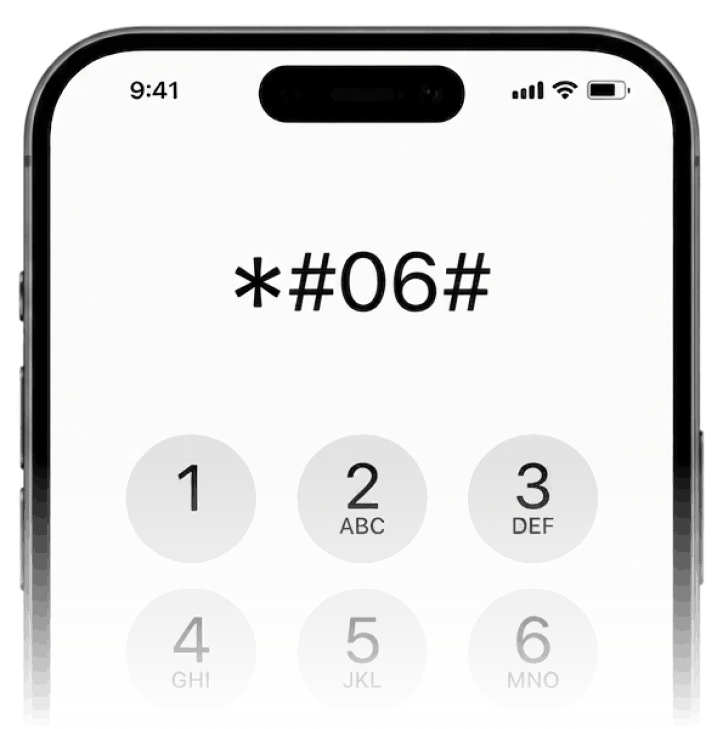
Dial *#06# to confirm compatibility
If an EID number appears on screen, your phone supports eSIM
eSIM vs Physical SIM
Set up your eSIM before you fly
Pick your plan
Choose your destination and a data plan on the Truecaller eSIM website.
Install your eSIM
Tap "Install eSIM" on the confirmation screen and follow the steps. Takes about 5 minutes.
Enable data plan
Turn on the Truecaller travel eSIM line in your phone’s Settings. Data consumption and validity won’t start until you land at your destination.
Activates on arrival
Your plan activates automatically when you land and connect to a local network.
Install before you travel (takes 5m) — you need an internet connection to complete setup. Don't wait until you've landed.
When you land
A few quick settings to make sure you're connected and not accidentally charged by your home carrier.
- 1
Turn on your Truecaller eSIM line
Settings → Mobile Service → Travel-Connect/ Plus→ Turn On This Line
- 2
Enable data roaming
Settings → Mobile Service → Truecaller eSIM → Data Roaming → On
- 3
Set it as your data source
Settings → Mobile Service → Mobile Data → select Truecaller eSIM
Turn off "Allow Mobile Data Switching"
If left on, your phone may switch to your home carrier's data and you'll be charged roaming rates.
Your home SIM stays on
Your primary SIM stays active for calls and texts. The Truecaller eSIM handles only the mobile data.
Managing your plan
Running low on data?
Top up anytime from My eSIMs. No reinstall needed — data is added instantly.
Heading somewhere else?
Buy a plan for your next destination. Your eSIM stays installed permanently.
Plan expiring?
We'll notify you before it runs out. We never auto-renew — you're only charged when you choose to.
Having trouble connecting?
Look for signal bars (LTE/5G) on the top-right corner of your phone – if you can see it, then you have internet access. Moreover, you can log into your account on the Truecaller iPhone app or Website and see if the dashboard says "Active" – if yes, this means that your eSIM data plan is now in active state and your plan validity has started.
If you are having trouble with internet access on the default network provider on your eSIM, go to Settings > Mobile Service > [eSIM name] > Network Selection and select [alternate operator].
- Ensure Data Roaming is turned ON for the eSIM.
- Ensure the eSIM is selected for Cellular Data.
- Toggle Airplane Mode on and off to reset the connection.
Your eSIM could be showing "No Service" due to the following reasons:
- Data roaming not enabled:Go to Settings > Mobile Service > [eSIM name] > Turn on this line > Turn the "Data Roaming" switch on
- You are outside the coverage area:If you have purchased an eSIM plan for a specific country or region, it will work in only that location and not outside it. However, you can easily fix this by purchasing the eSIM data plan for your current location from our app or website (internet access required).
- eSIM Activation issue:Another reason could be that your eSIM is not Activated correctly yet and you need to reinstall the eSIM. You can check if the activation was done properly by checking the Truecaller iPhone app or Website's dashboard to see if it says "Active". This means the eSIM was installed correctly (but Data Roaming may not be enabled or you may be out of coverage area). If it says "Not Activated", you need go through the eSIM Activation flow once again by tapping on the Activate button or scanning the QR code.
Yes, you can uninstall and reinstall Truecaller's travel eSIM. However, you can only use one eSIM on the same device – you cannot transfer the same eSIM between different devices.
You can reinstall one eSIM on your device a maximum of five times. If you uninstall the eSIM a fifth time, it will stop working and you will lose all the travel eSIM plans you purchased for it.
Got more questions? See more FAQs here.
Ready to get connected?
Find a plan for your destination. Set up in minutes, active on arrival.