Trusted by 500 million+ users
Check any URL before you click
Wondering if the website link you received is a scam? Paste it below and Truecaller's free URL checker will tell you if the website is safe, suspicious or a known fraud.
Why use Truecaller's link checker tool
Free to use
Truecaller's URL checker tool is free to use for everyone, no login needed!
Multi-layer checks
Every link you query goes through multiple layers of checks before we give you a verdict. It is screened against community fraud reports, known phishing and scam databases, and various domain signals.
Get results in seconds
See at a glance whether the website looks safe, suspicious, or dangerous — plus the reasons behind the verdict and what to do next.
Community reports
If a Truecaller user has reported a scam by the same URL, you can read their experience and learn how the scams operate and how to remain protected from them.
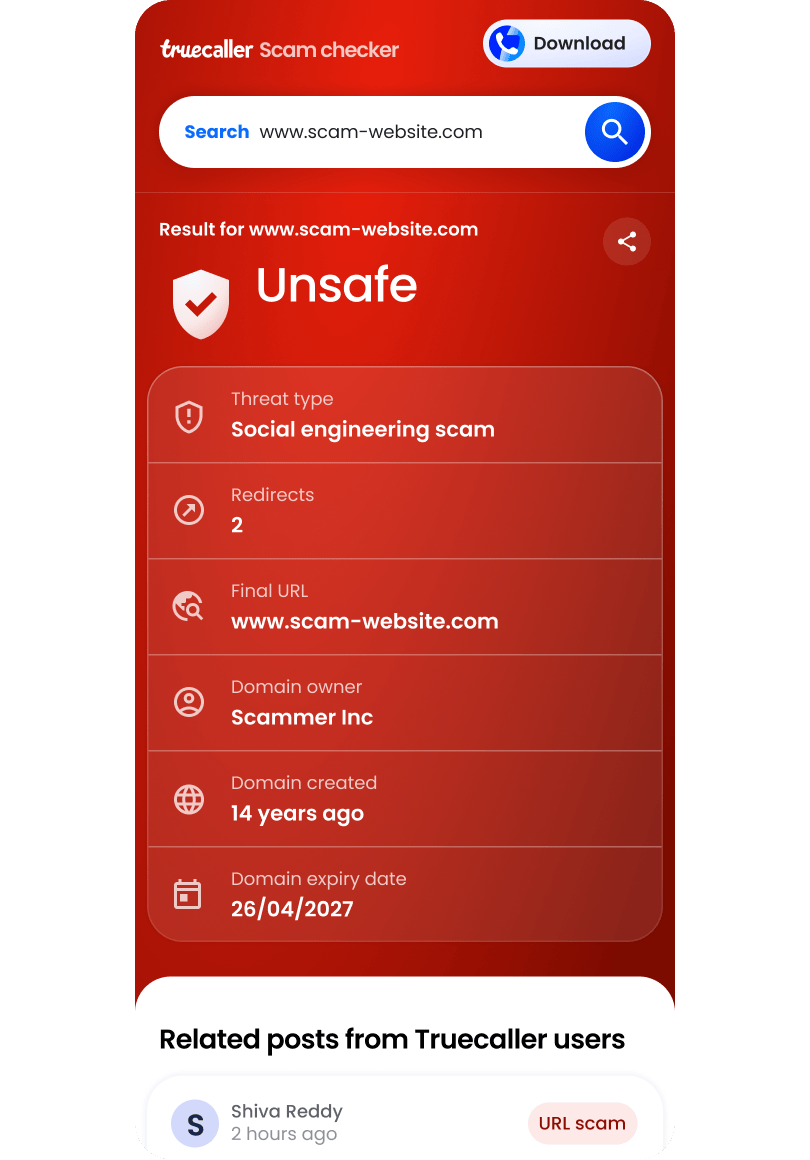
What information does Truecaller link checker show?
Verdict
If a URL is safe or scam
Scam type
What type of scam the website is running
Redirects
How many times a URL is redirected
Final URL
The final destination URL at which the redirects of the link ends
Domain owner
Who owns the domain of the link you received
Domain registration & expiry date
When the website was first registered and expires
Download Truecaller for 360-degree protection
Truecaller protects you with not just URL scams but also phone scams, SMS frauds, and much more!
What is a phishing scam?
In a phishing scam, fraudsters cast a wide net by sending out mass emails or messages, hoping to trick recipients into providing their sensitive information like their bank account information, credit card details, email ID/ passwords, and similar important personal information. These messages often contain urgent or alarming requests, targeting recipients to click on links or open attachments that lead to fake login pages or malicious software installations.

What is a malicious link?
A malicious link is a URL designed to harm you when you open it. Some lead to phishing pages that imitate trusted brands to steal your passwords or card details, while others trigger downloads of malware that can spy on your device or lock your files. The most common malicious links simply point to fraudulent websites — fake online shops, bogus investment platforms etc — where the scam is the business itself. Malicious links usually arrive through SMS, WhatsApp, Telegram, email, or social media, often disguised behind shortened URLs or look-alike domains. Checking a link before you click is the simplest way to stay safe.
How to identify if a website link is safe or scam
The quickest route is the search bar above — but these habits keep you safer everywhere.
- Look closely at the address
Many scam sites contain no malware at all — the fraud is in the business, not the code, so virus scanners find nothing wrong. Truecaller draws on scam reports from a community of over 450 million people across calls, messages and the web, which helps flag fraudulent sites that technical scanners miss. - Don't trust the padlock alone
HTTPS means your connection to the website is encrypted. It does not mean the website is honest — scammers can get security certificates too. Treat the padlock as a minimum requirement, never as proof. - Watch for pressure and too-good-to-be-true offers
Countdown timers, "only 2 left", unrealistic discounts and demands for instant payment are designed to stop you thinking. Genuine businesses don't need to rush you. If a deal seems too good to be true, it almost always is. - Check how the site wants you to pay
Fake shops push payment methods with no buyer protection — bank transfers, gift cards or cryptocurrency. A legitimate retailer offers cards and recognised digital wallets, and never asks for one-time codes outside its own checkout. - When in doubt, check before you click
Paste the link into the URL checker at the top of this page. It takes seconds, it's free, and it draws on scam reports from one of the world's largest safety communities — so you're never judging a suspicious link on your own.
Search a URL
Protect yourself from all URL scams with our free link checker tool
Common URL scams you may come across
Fake delivery notifications
A SMS or email claims a parcel is held up and asks you to pay a small "customs" or "redelivery" fee. The link leads to a convincing copy of the legit courier's website and asks you to enter your card details.
Bank and payment phishing
A message warns that your account is blocked or a payment failed, with a link to "verify" your details. The page mimics your bank's login screen and steals whatever you type, including the login ID, password, and the one-time passcodes.
Fake online shops
A website offers branded goods at unbelievable discounts, often advertised on social media platforms like Instagram, Snapchat, or TikTok. The shop either never delivers the goods, sends fake items, or simply steals your payment details.
Look-alike domains
Scammers register addresses one character away from brands you trust — an extra hyphen, a swapped letter, or ".net" instead of ".com". For example, Amaz0n.com instead of Amazon.com. At a glance, the fake link will not look like a scam that the average person can spot, and that's what the scammers are counting on.
Prize and giveaway scams
A message containing a website link announces you've won a phone, a voucher, or a lottery that you never entered. To "claim" it, you're asked for personal details, a delivery fee, or both.
Fake investment platforms
A polished website promises guaranteed returns on crypto, shares or forex, often with fabricated celebrity endorsements. Deposits are easy; withdrawals are impossible.
Tech support pop-ups
A page floods your screen with warnings that your device is infected and urges you to call a number or download a "fix". The file you download is either infected, gives remote access to your device to the scammer so they can steal your data, or locks down your device until pay the scammer some money.
Job offer scams
A recruiter shares a website link to a role with high pay for little work, then asks you to register with personal documents or pay for training or equipment. Legitimate employers never charge you to get hired.
Fraud protection that goes beyond URLs
Scams don't only arrive as links. Get the Truecaller app to identify unknown callers, filter scam messages, and stay protected in real time.
Truecaller's link checker is a free tool that analyses a URL and tells you whether the website behind it is safe, suspicious, or scam. Truecaller's URL checker combines community fraud reports, domain intelligence, and known phishing databases to give you a clear verdict before you click.
Copy the link you received, paste it into the search bar at the top of this page and click on Check Now. Within seconds you'll see a safety verdict along with the signals behind it, such as the domain's age, community reports and whether it appears on known scam lists.
When you search a URL on Truecaller, you will be able to see if it is a scam as well as what type of scam it is. It will also show you how many times the link gets redirected before landing on the final destination URL -- legitimate websites don't redirect their users usually. You will also see who owns the domain, how long ago it was registered and when it will expire. Websites that were registered very recently or will expire very soon are usually not considered legitimate, though there can be exceptions.
Yes. Checking a URL is free and you don't need to install anything. You do not need to login to check the link.
For always-on protection against fraudulent links as well as scam calls messages, you can download the Truecaller app.
Yes. The padlock only means your connection to the site is encrypted — it says nothing about who runs the site. Scammers routinely use HTTPS on fake shops and phishing pages, which is why a proper check looks at many more signals than the padlock alone.
Don't open the link, and never enter passwords, card details or one-time passcodes on the site. If the link came by SMS or a messaging app, report and block the sender. If you've already entered details, change your passwords, and contact your bank straight away.
A phishing website impersonates a brand you trust — like a bank or delivery company — to steal your login or card details. A scam website is broader: it can be a fake shop, a bogus investment platform or a fraudulent offer. Truecaller's URL checker screens for both.
Links are analysed to produce your safety verdict and to improve scam detection for the whole community. Checks aren't linked to your identity. For full details, see the Truecaller privacy policy.
Many scam sites contain no malware at all — the fraud is in the business, not in the code, so virus scanners find nothing wrong. Truecaller draws on scam reports from a community of over 500 million people across calls, messages and the web, which helps flag fraudulent sites that technical scanners miss.